




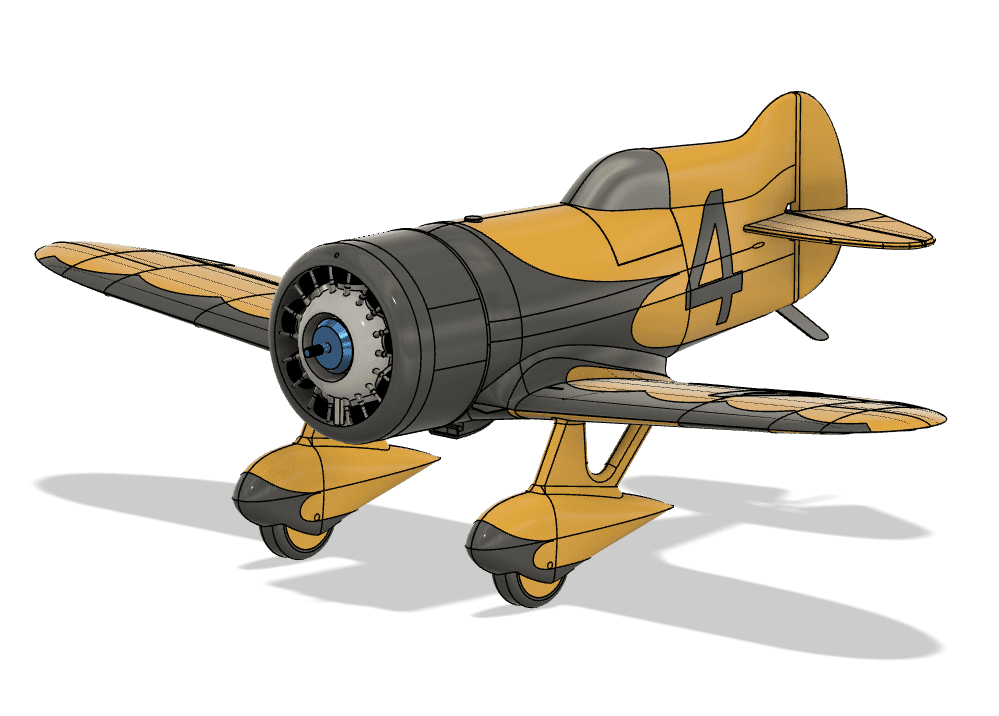
3D Printed - Gee Bee Model Z 1931 Racer 600mm 1:12 scale

Description
The Granville Gee Bee Model Z was an American racing aircraft that was built, successfully raced to victory, then destroyed in a deadly crash in 1931. It was the first of the Super Sportster aircraft built by Granville Brothers Aircraft of Springfield, Massachusetts, with the sole intent of winning the Thompson Trophy, which it did in September 1931.
This 600mm wingspan 3D printed 1:12 scale rendition is powered by a BR2205 drone motor with 2300Kv and is designed to be printed in Active Foaming LW-PLA, with a few key parts in PLA+, like the motor mount, servo and battery tray. The design has carefully planned internal structures for LW-PLA slicing resulting in clean parts with minimal oozing.
Included with this set:
• Prusa Slicer 3MF slicer files
• GCode files for typical cartesian printer
• Valid STL files for all components
• Assembly manual and user guide
3D printing for R/C airplanes started around 2015 with 3DLabPrint. Their early designs were heavy and fragile. Go forward almost 10 years and this segment of the R/C Airplane hobby has matured to a point where the airframe can rival in weight and performance with commercial offerings. In a few days you can print all the parts required and then assemble in a day or 2, while previously, building a custom model out of balsa or composite would take months.
New filaments like Active Foaming LW-PLA are allowing to build light and fairly resilient airframes, when coupled with the right amount of carbon fiber rods and tubes. The early designs were based on brittle PLA and completely over weight.
Once you have the electronics, and a decent 3D printer, the actual cost to produce the airframe is really small. My Z requires only 100g of LW-PLA and 20g of PLA+, which amounts to less than 10$ in filament. After a small mishap, usually a bit of Super Glue will do the job. For more significative damage, I can print spare parts, cut off the broken parts, sand flush, glue the new parts and get back in the air within a day or two.
I've designed a couple of pylon racers and several warbirds. I tend to like the lesser known top dogs. I started this World Tour and trying to cover every country during WWII.
- The best French WWII fighter; Arsenal VG.33
- The Japanese Imperial Army counterpart to the famous Zero/Zeke ; Ki-43 Hayabusa (aka Oscar)
- Australia's only inhouse fighter; CAC Boomerang
- BF-109's early competition; He-112B
- The best mass produced Italian fighter; Macchi MC.202 Folgore
- Russia's tank buster; Il-2 Sturmovik
- US Navy early top fighter ; F4F Wildcat
- and a few more
The "Z" is my first step into the fun world of 1930's pylon racing and Golden Era.
Designing 3D airplanes is not a simple task. Designing a successful airframe even less. As this segment of the hobby is maturing, more and more are exploring and trying their hands at designing their own. I designed my first virtual 3D airplane around 1984, writing FORTRAN code to display my Gee Bee R1 on a then top of the line Tektronix's Cavalier-type monitor with a very limited display duration. I was teaching AutoCAD for a while, led software engineering team on some of the top video and special effects software. And now that I am retired, I am combining many aspects for my own pleasure; 3D printing, CAD, airplane design, electronics (maintaining/making my own printers).
You can now get a very decent printer for less than 200$, like the Elegoo Neptune 3 Pro. Or a top of the line Bambu Labs X1 (with a micro LIDAR device) for perfect print, time after time... Or so they say. But for 200$, you can get a decent 3D printer, then a couple of rolls of PLA+ and LW-PLA and start printing an amazing 1931 famous pylon racer! You'll also need a Slicer software, like the free Prusa Slicer to feed your printer the flow of commands required to print each part.
Printing a cube is one thing, printing an airplane is another beast; as filament is heavy thermoplastic, you and your printer need to be able to print single wall complex shapes, with the current favorite filament type (Active Foaming LW-PLA), where a higher printing temperature is forcing an additive to print a bubble up and foam the LW-PLA. You then print a thin wall with half the normal amount of plastic. Using regular PLA to print my "Z" would jump the total AUW from 275g to 375g - and be brittle like hell.
OK, this Gee Bee Z racer is not for a beginner pilot. It is small and fast - heck, it's a pylon racer, isn't it? Beginner pilots are much better out with a rugged high wing foamy trainer (in EPP or EPO foam). 3D printing although getting more popular is it still requiring some hands-on fiddling to keep the printer well tuned - unless you go ape on the piggy bank for a Bambu Labs X1. Even so, Bambu Labs is relying on a few new high tech gadgets, like LIDAR, which forced them to offer their own custom Slicer, which, in turn, means, right now, required knowledge on Slicing parameters. The X1 is a great printer, but most designers like myself, aren't providing ready-made files for it, so, if you fancy a 3D printed plane, most likely you will have to build the slicing files from the raw STL files, otherwise, stick to a wider supported printer like the Prusa MK3/4 or Elegoo Neptune 3/4.
Anyway, if you are looking for simple, and content with having the 4th Spitfire or P51 Mustang on the club's line-up, don't go for 3D printed airplanes. But if you are a tinkerer, like to fly and/or show off unusual airplanes, or just want to put to good use the parts from those defunct commercial foamies, or just because you really want to try something different...
BTW, a complete list of items required is included with the instructions.
Photos
Part list
| Part Category | Part Name | Qty | Price |
|---|---|---|---|
| — | STLs, GCode, 3MF files | 1 | $17 |
| — | RS2205 2300Kv Drone Motor | 1 | $7.24 |
| — | 4ch receiver FRSKY D16 compatible | 1 | $11.89 |
| — | 3.7g digital servo | 3 | $3.89 |
| — | Gemfan 6x4 E | 1 | $2.38 |
| — | GNB 550mAh 3S 80c | 1 | $11.59 |
| — | 6x2 Magnets | 1 | $2.55 |